
SearchVector / Reporting workflows
再現可能なレポートは次から始まります 明確な仕様
自動化された SEO レポートは、データの収集、解釈、文書の作成、配信をまとめます。接続されたダッシュボードは、そのワークフローの一部のみをカバーします。どのステップを自動化するかを選択する前に、読者がレポートに対して何を行う必要があるかを決定してください。
YOUR REPORT OUTLINE · LOCAL PLAN
Monthly report for seo team
- Search clicks and impressions
- Query and page changes
- Prioritized fixes with owners
Compare the last complete calendar month with the previous month. Explain different month lengths and seasonality.
Connect an authorized GSC property and verify available dates before assembling a report.
Prepare a document, review the figures and commentary, then share through your chosen channel.
- Record the project/property, exact date window, filters and source retrieval time.
- Assign a reviewer and confirm recipient access before sharing.
- Save the reviewed version and the date it was shared.
再現可能なレポートは次から始まります 明確な仕様
自動化された SEO レポートは、データの収集、解釈、文書の作成、配信をまとめます。接続されたダッシュボードは、そのワークフローの一部のみをカバーします。どのステップを自動化するかを選択する前に、読者がレポートに対して何を行う必要があるかを決定してください。
SearchVector のプロジェクト概要では、Search Console のクリック数、インプレッション数、CTR、平均掲載順位がレポート入力として提供されます。これらの数値を、定義されたプロパティ、日付ウィンドウ、レビュー プロセスとともに使用します。スケジュールされた監査の実行だけでは、スケジュールされたレポート配信が確立されません。
読者がレポートを見た後にどのような決定を下すべきかを定義します。
選択したプロパティ、日付、フィルター、ソースをすべての図とともに記録します。
報告範囲
質問を選択してください
Included
読者がレポートを見た後にどのような決定を下すべきかを定義します。
スコープを取り付けたままにしておきます
Included
選択したプロパティ、日付、フィルター、ソースをすべての図とともに記録します。
The reporting inputs inside SearchVector
Start with the selected project’s search performance. This real overview shows clicks, impressions, average CTR, average position, a daily trend and country distribution.
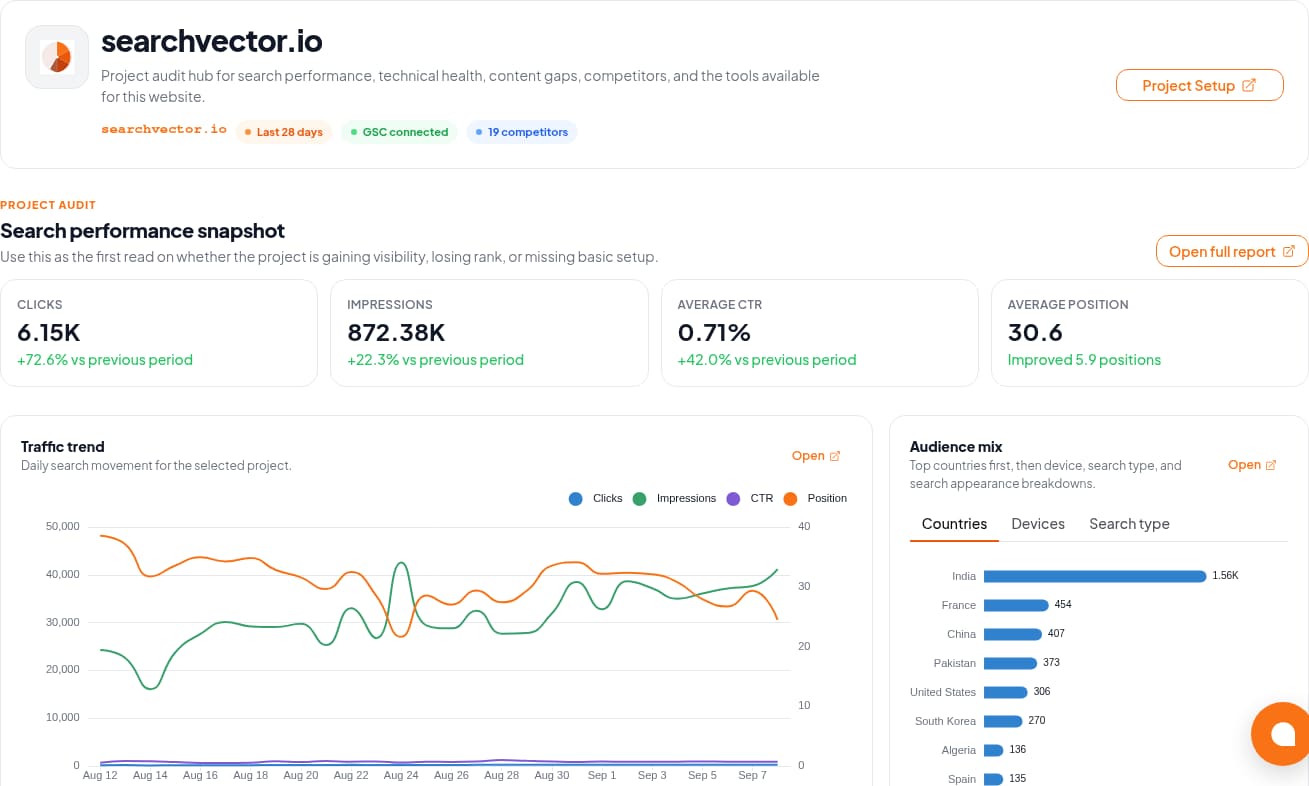
The GSC Analytics documentation describes connection and metric workflows. Verify the property and available dates in your account before using its data in a report.
Workflow
Four steps. Different responsibilities.
Use this boundary map when evaluating an automated SEO reporting workflow.
01
Retrieve
Select the authorized property and confirm date coverage. Keep search metrics separate from revenue or lead data supplied from another source.
02
Review
Explain material changes and add completed work, priorities, and owners. Avoid attributing every change to SEO activity.
03
Prepare
Use a consistent document layout and record the filters and retrieval date. Check that the exported artifact matches the reviewed data.
04
Deliver
Agree on recipients, permissions, and time zone. If automation is essential, test the actual scheduler and delivery channel before relying on it.
Design for the report that should not send
A delivery time is only one requirement. Define a stop condition and an owner for each failure.
Access disconnected
Stop the run. Ask the property owner to restore authorized access and confirm that the intended project is still selected.
Period incomplete
Label the gap. Check source availability and matching filters; a missing figure is not zero. Wait for complete data or explicitly agree on a partial report.
Delivery failed or duplicated
Keep a run identifier and delivery record in your chosen workflow. Before retrying, check whether the recipient already received that version.