
SearchVector / Reporting workflows
Een herhaalbaar rapport begint met een duidelijke specificatie
Geautomatiseerde SEO-rapportage brengt gegevensverzameling, interpretatie, documentcreatie en levering samen. Een verbonden dashboard dekt slechts een deel van die workflow. Bepaal wat lezers met het rapport moeten doen voordat u kiest welke stappen u wilt automatiseren.
YOUR REPORT OUTLINE · LOCAL PLAN
Monthly report for seo team
- Search clicks and impressions
- Query and page changes
- Prioritized fixes with owners
Compare the last complete calendar month with the previous month. Explain different month lengths and seasonality.
Connect an authorized GSC property and verify available dates before assembling a report.
Prepare a document, review the figures and commentary, then share through your chosen channel.
- Record the project/property, exact date window, filters and source retrieval time.
- Assign a reviewer and confirm recipient access before sharing.
- Save the reviewed version and the date it was shared.
Een herhaalbaar rapport begint met een duidelijke specificatie
Geautomatiseerde SEO-rapportage brengt gegevensverzameling, interpretatie, documentcreatie en levering samen. Een verbonden dashboard dekt slechts een deel van die workflow. Bepaal wat lezers met het rapport moeten doen voordat u kiest welke stappen u wilt automatiseren.
Het projectoverzicht van SearchVector biedt Search Console-klikken, vertoningen, CTR en gemiddelde positie als rapportage-invoer. Gebruik die cijfers met een gedefinieerde eigenschap, datumvenster en beoordelingsproces. Geplande auditruns zorgen op zichzelf niet voor een geplande levering van rapporten.
Bepaal welke beslissing de lezer moet nemen na het zien van het rapport.
Leg bij elk cijfer de geselecteerde eigenschap, data, filters en bron vast.
Rapportagebereik
Kies een vraag
Included
Bepaal welke beslissing de lezer moet nemen na het zien van het rapport.
Houd de scoop aangesloten
Included
Leg bij elk cijfer de geselecteerde eigenschap, data, filters en bron vast.
The reporting inputs inside SearchVector
Start with the selected project’s search performance. This real overview shows clicks, impressions, average CTR, average position, a daily trend and country distribution.
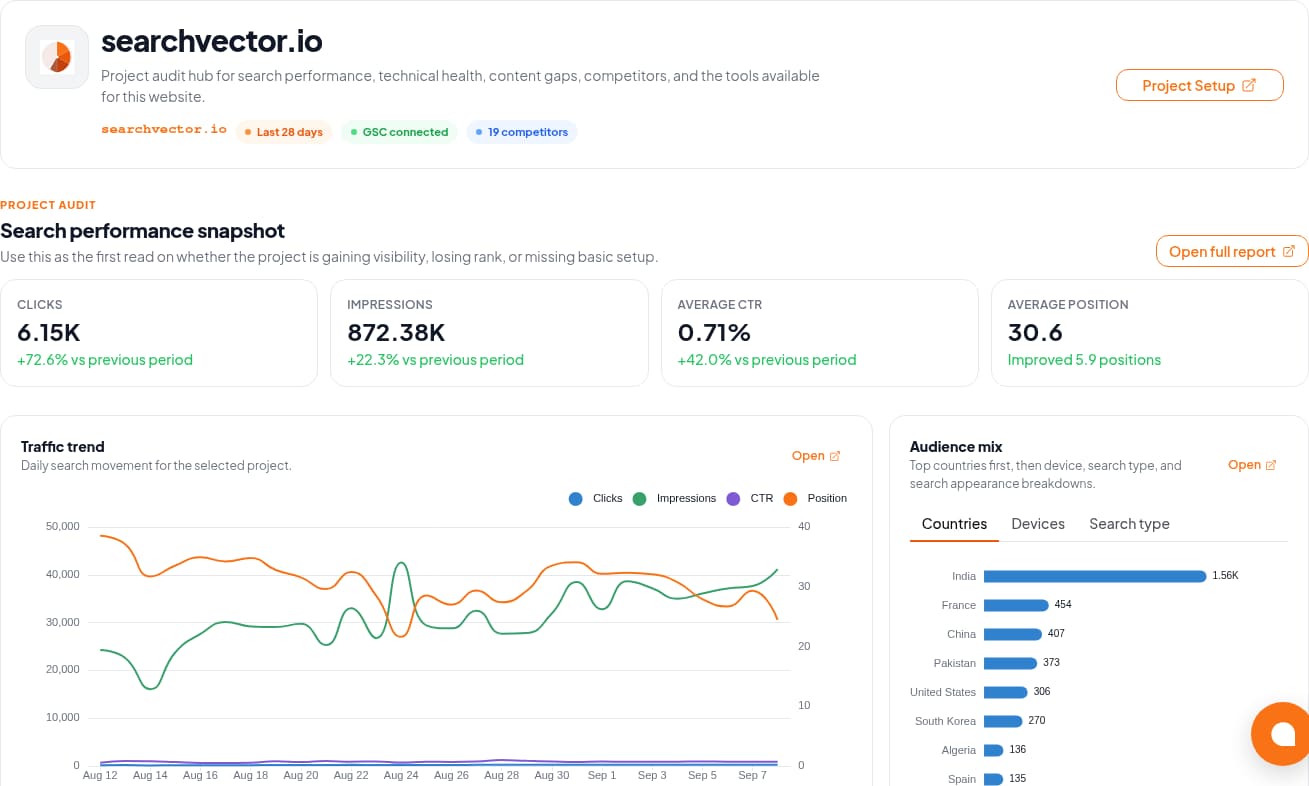
The GSC Analytics documentation describes connection and metric workflows. Verify the property and available dates in your account before using its data in a report.
Workflow
Four steps. Different responsibilities.
Use this boundary map when evaluating an automated SEO reporting workflow.
01
Retrieve
Select the authorized property and confirm date coverage. Keep search metrics separate from revenue or lead data supplied from another source.
02
Review
Explain material changes and add completed work, priorities, and owners. Avoid attributing every change to SEO activity.
03
Prepare
Use a consistent document layout and record the filters and retrieval date. Check that the exported artifact matches the reviewed data.
04
Deliver
Agree on recipients, permissions, and time zone. If automation is essential, test the actual scheduler and delivery channel before relying on it.
Design for the report that should not send
A delivery time is only one requirement. Define a stop condition and an owner for each failure.
Access disconnected
Stop the run. Ask the property owner to restore authorized access and confirm that the intended project is still selected.
Period incomplete
Label the gap. Check source availability and matching filters; a missing figure is not zero. Wait for complete data or explicitly agree on a partial report.
Delivery failed or duplicated
Keep a run identifier and delivery record in your chosen workflow. Before retrying, check whether the recipient already received that version.