
SearchVector / Reporting workflows
可重复的报告始于 明确的规范
自动化 SEO 报告汇集了数据收集、解释、文档创建和交付。连接的仪表板仅涵盖该工作流程的一部分。在选择自动化步骤之前,确定读者需要对报告执行哪些操作。
YOUR REPORT OUTLINE · LOCAL PLAN
Monthly report for seo team
- Search clicks and impressions
- Query and page changes
- Prioritized fixes with owners
Compare the last complete calendar month with the previous month. Explain different month lengths and seasonality.
Connect an authorized GSC property and verify available dates before assembling a report.
Prepare a document, review the figures and commentary, then share through your chosen channel.
- Record the project/property, exact date window, filters and source retrieval time.
- Assign a reviewer and confirm recipient access before sharing.
- Save the reviewed version and the date it was shared.
可重复的报告始于 明确的规范
自动化 SEO 报告汇集了数据收集、解释、文档创建和交付。连接的仪表板仅涵盖该工作流程的一部分。在选择自动化步骤之前,确定读者需要对报告执行哪些操作。
SearchVector 的项目概览提供了 Search Console 点击次数、展示次数、CTR 和平均排名作为报告输入。使用具有定义属性、日期窗口和审核流程的这些数据。计划的审计运行本身并不建立计划的报告交付。
定义读者在看到报告后应该做出哪个决定。
记录每个图的选定属性、日期、过滤器和来源。
报告范围
选择一个问题
Included
定义读者在看到报告后应该做出哪个决定。
保留附加范围
Included
记录每个图的选定属性、日期、过滤器和来源。
The reporting inputs inside SearchVector
Start with the selected project’s search performance. This real overview shows clicks, impressions, average CTR, average position, a daily trend and country distribution.
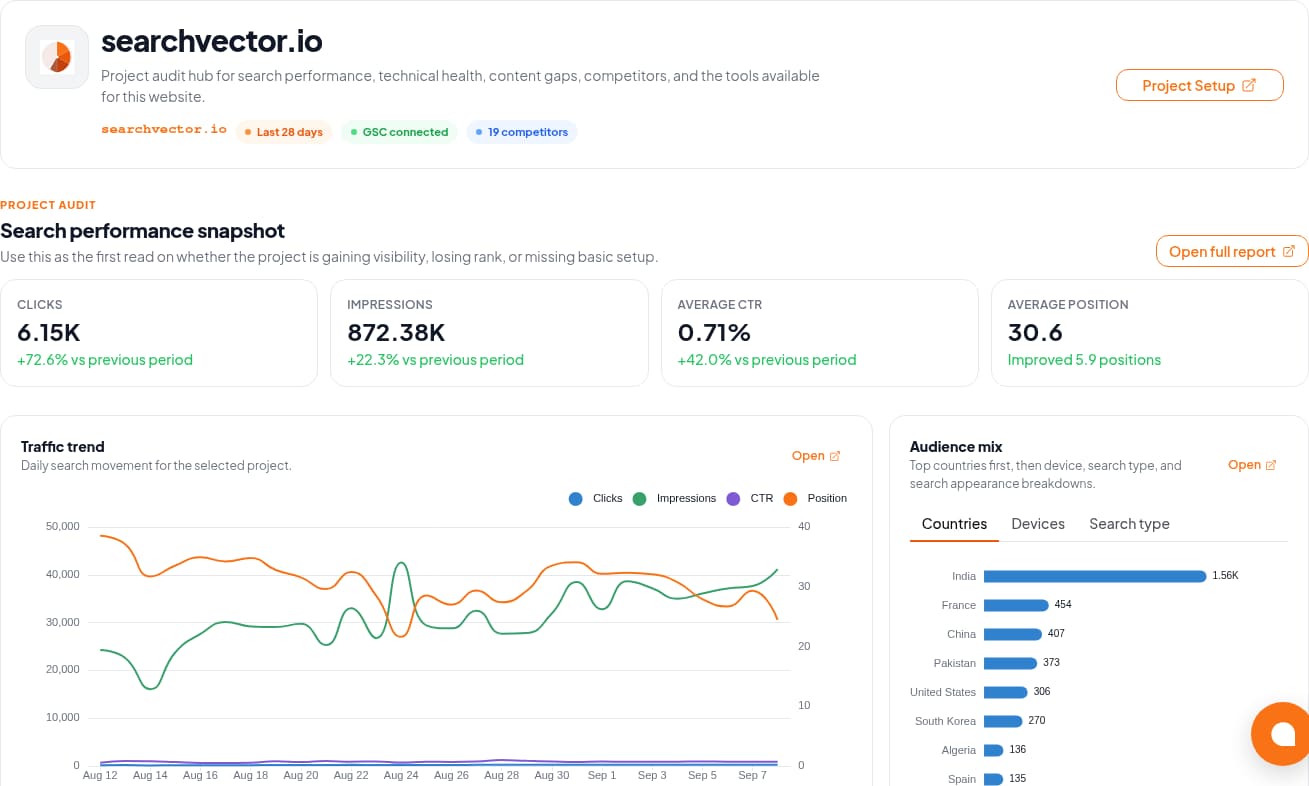
The GSC Analytics documentation describes connection and metric workflows. Verify the property and available dates in your account before using its data in a report.
Workflow
Four steps. Different responsibilities.
Use this boundary map when evaluating an automated SEO reporting workflow.
01
Retrieve
Select the authorized property and confirm date coverage. Keep search metrics separate from revenue or lead data supplied from another source.
02
Review
Explain material changes and add completed work, priorities, and owners. Avoid attributing every change to SEO activity.
03
Prepare
Use a consistent document layout and record the filters and retrieval date. Check that the exported artifact matches the reviewed data.
04
Deliver
Agree on recipients, permissions, and time zone. If automation is essential, test the actual scheduler and delivery channel before relying on it.
Design for the report that should not send
A delivery time is only one requirement. Define a stop condition and an owner for each failure.
Access disconnected
Stop the run. Ask the property owner to restore authorized access and confirm that the intended project is still selected.
Period incomplete
Label the gap. Check source availability and matching filters; a missing figure is not zero. Wait for complete data or explicitly agree on a partial report.
Delivery failed or duplicated
Keep a run identifier and delivery record in your chosen workflow. Before retrying, check whether the recipient already received that version.