
SearchVector / Reporting workflows
반복 가능한 보고서는 다음으로 시작됩니다. 명확한 사양
자동화된 SEO 보고는 데이터 수집, 해석, 문서 생성 및 전달을 통합합니다. 연결된 대시보드는 해당 워크플로우의 일부만 다룹니다. 자동화할 단계를 선택하기 전에 독자가 보고서로 수행해야 할 작업을 결정하십시오.
YOUR REPORT OUTLINE · LOCAL PLAN
Monthly report for seo team
- Search clicks and impressions
- Query and page changes
- Prioritized fixes with owners
Compare the last complete calendar month with the previous month. Explain different month lengths and seasonality.
Connect an authorized GSC property and verify available dates before assembling a report.
Prepare a document, review the figures and commentary, then share through your chosen channel.
- Record the project/property, exact date window, filters and source retrieval time.
- Assign a reviewer and confirm recipient access before sharing.
- Save the reviewed version and the date it was shared.
반복 가능한 보고서는 다음으로 시작됩니다. 명확한 사양
자동화된 SEO 보고는 데이터 수집, 해석, 문서 생성 및 전달을 통합합니다. 연결된 대시보드는 해당 워크플로우의 일부만 다룹니다. 자동화할 단계를 선택하기 전에 독자가 보고서로 수행해야 할 작업을 결정하십시오.
SearchVector의 프로젝트 개요는 Search Console 클릭수, 노출수, CTR 및 평균 게재순위를 보고 입력으로 제공합니다. 정의된 속성, 날짜 창 및 검토 프로세스와 함께 해당 수치를 사용하십시오. 예약된 감사 실행은 자동으로 예약된 보고서 전달을 설정하지 않습니다.
보고서를 본 후 독자가 어떤 결정을 내려야 하는지 정의합니다.
모든 그림에 선택한 속성, 날짜, 필터 및 소스를 기록합니다.
보고 범위
질문을 선택하세요
Included
보고서를 본 후 독자가 어떤 결정을 내려야 하는지 정의합니다.
범위를 첨부된 상태로 유지
Included
모든 그림에 선택한 속성, 날짜, 필터 및 소스를 기록합니다.
The reporting inputs inside SearchVector
Start with the selected project’s search performance. This real overview shows clicks, impressions, average CTR, average position, a daily trend and country distribution.
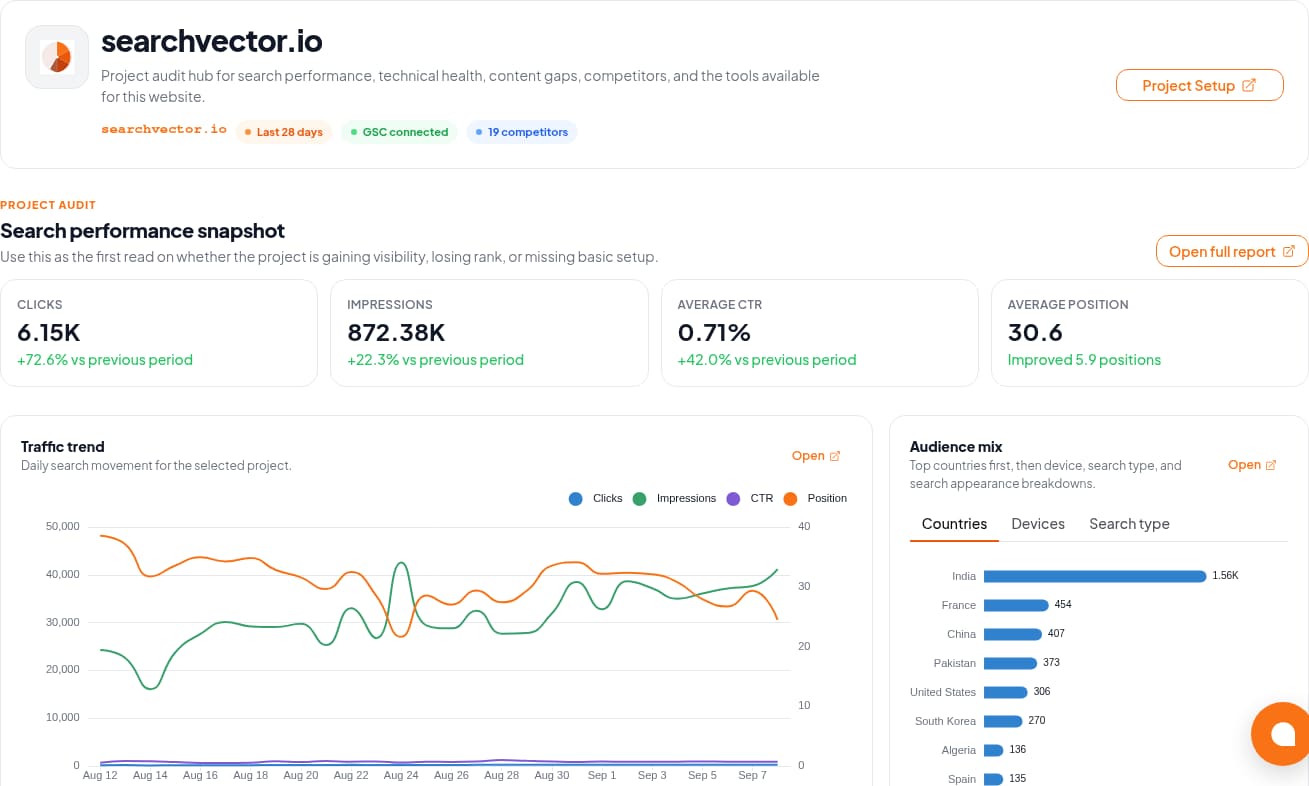
The GSC Analytics documentation describes connection and metric workflows. Verify the property and available dates in your account before using its data in a report.
Workflow
Four steps. Different responsibilities.
Use this boundary map when evaluating an automated SEO reporting workflow.
01
Retrieve
Select the authorized property and confirm date coverage. Keep search metrics separate from revenue or lead data supplied from another source.
02
Review
Explain material changes and add completed work, priorities, and owners. Avoid attributing every change to SEO activity.
03
Prepare
Use a consistent document layout and record the filters and retrieval date. Check that the exported artifact matches the reviewed data.
04
Deliver
Agree on recipients, permissions, and time zone. If automation is essential, test the actual scheduler and delivery channel before relying on it.
Design for the report that should not send
A delivery time is only one requirement. Define a stop condition and an owner for each failure.
Access disconnected
Stop the run. Ask the property owner to restore authorized access and confirm that the intended project is still selected.
Period incomplete
Label the gap. Check source availability and matching filters; a missing figure is not zero. Wait for complete data or explicitly agree on a partial report.
Delivery failed or duplicated
Keep a run identifier and delivery record in your chosen workflow. Before retrying, check whether the recipient already received that version.