
Integration
Connect Google Tag Manager
This Google Tag Manager integration connects your GTM accounts to SearchVector with one Google sign-in. The GTM Audit tool then lets you inspect containers, workspaces, tags, triggers and variables, and flags paused tags, tags without firing triggers and unused triggers, without changing anything in GTM.
Read-only access
Tags, triggers and variables
CSV and copy export
SearchVector · Google Tag Manager integration
How it works
Connect Google Tag Manager in three steps
Sign in, choose a container, review your setup.
One connection, a full audit
Everything your Tag Manager container can show you
VIEW 1 OF 3
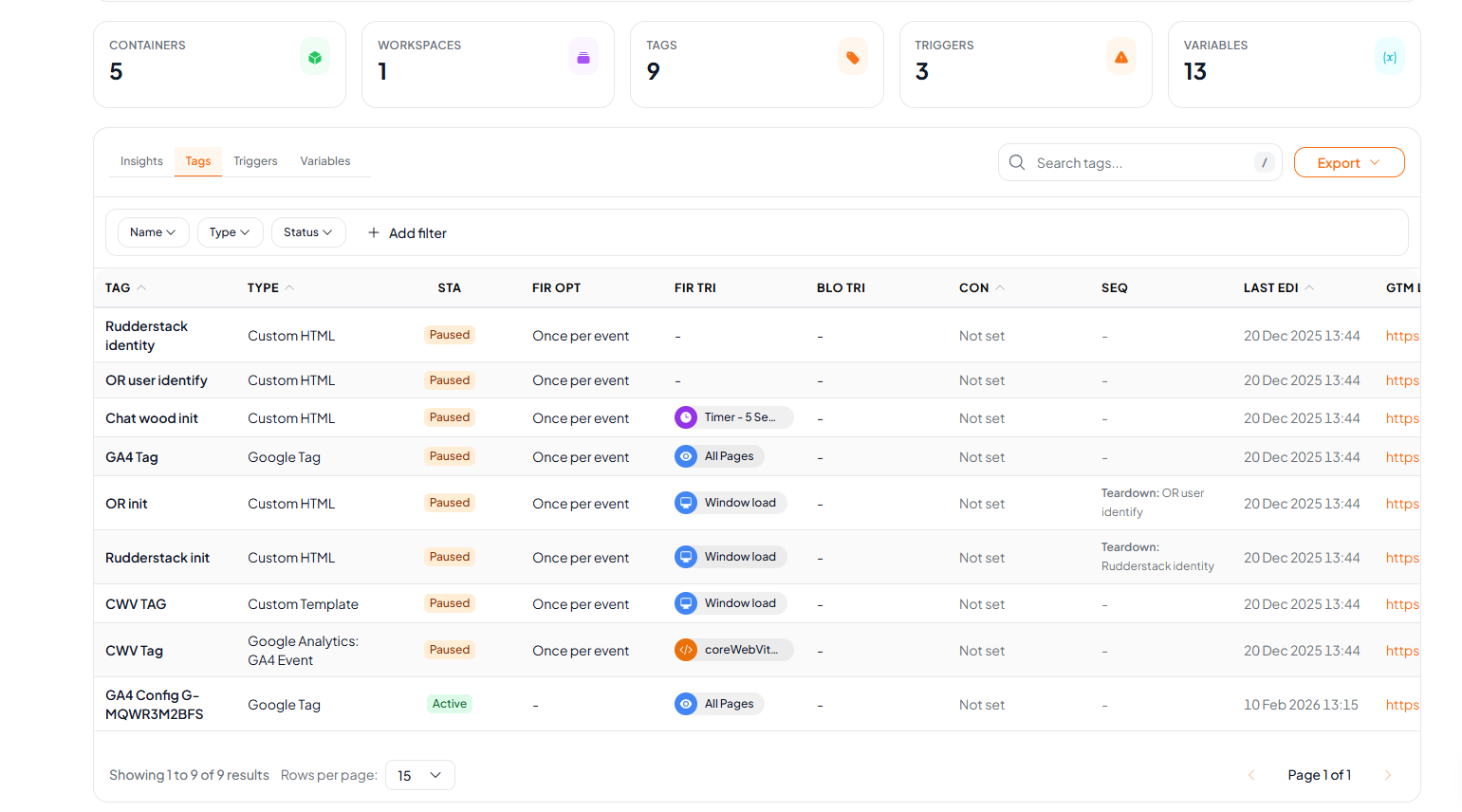
Review every tag in your container
Each tag with its type, status and the triggers that fire or block it, so paused and untriggered tags stand out.
Tag name, type and Active or Paused status
Firing option, firing triggers and blocking triggers
Consent, sequencing and last edited date
Search, filters, column controls and a link to each tag in GTM
SearchVector · Tags
API
Automate your Google Tag Manager audit with SearchVector Google Tag Manager APIs
Read your Google Tag Manager accounts, containers, workspaces, tags, triggers and variables through the SearchVector API. Use it to automate your tracking audits without clicking through GTM by hand.
REST API
API key auth
cURL
curl --request GET \ --header "Authorization: YOUR_API_KEY" \ --header "Content-Type: application/json" \ --url "https://searchvector.io/api/gtm/?resource=tags&token_id={token_id}&account_id={account_id}&container_id={container_id}&workspace_id={workspace_id}"Replace YOUR_API_KEY with your API key. Get your API token
Built for tracking setups
Every container, one place
Pick the account, container and workspace you want to review and switch between them without leaving the tool.
Browse accounts, containers and workspaces from a connected Google account
Read-only access, so SearchVector cannot change your container
Every tag and variable links to its page in Google Tag Manager
Skip the spreadsheet step
| What you need | Manual way | In SearchVector |
|---|---|---|
| Find paused tags | Open each tag in GTM and check its status | Filter the Tags tab by status |
| See which triggers your tags use | Open each trigger and check its tags | Read the Used by column on the Triggers tab |
| List every variable | Click through the Variables screen | Open the Variables tab and export |