
Integration
Connect Google Ads
This Google Ads integration links your ad accounts to SearchVector, including manager accounts and their sub-accounts. Once connected, you can review campaigns, keywords, search terms and wasted spend in dashboards built for each question, instead of exporting reports by hand.
Manager accounts supported
Campaigns, keywords and search terms
Disconnect any time
SearchVector · Google Ads integration
How it works
Connect Google Ads in three steps
Sign in, choose what to connect, open your reports.
One connection, four tools
Everything your Google Ads account can show you
TOOL 1 OF 4
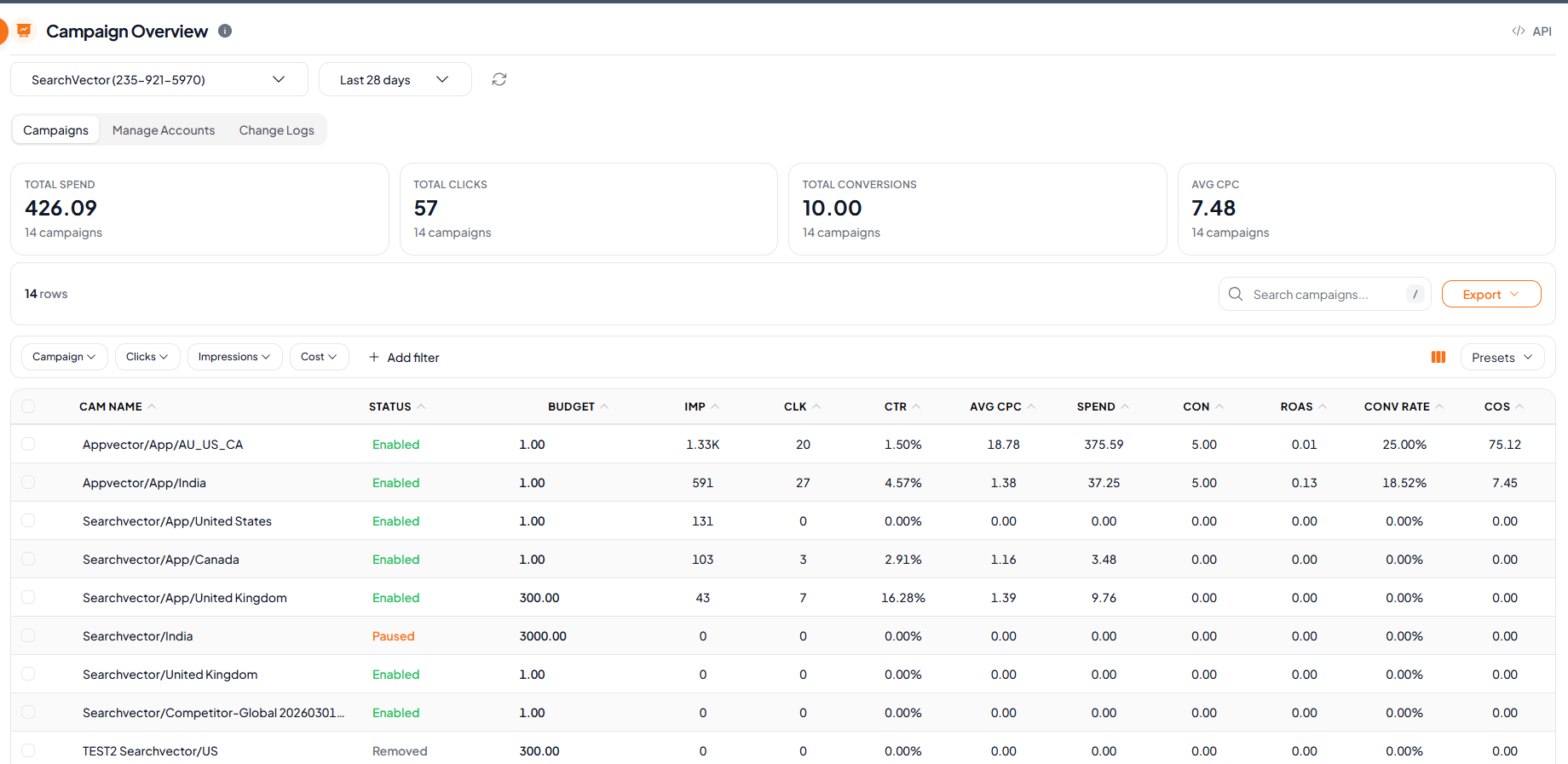
See every campaign in one table
Start here. Total spend, clicks, conversions and average CPC sit above a table of every campaign, with filters for the way you review.
Status, budget, impressions, clicks, CTR, CPC, spend, conversions and ROAS per campaign
Filter by campaign, clicks, impressions or cost, with filter presets
Search campaigns, show or hide columns, export to CSV or copy
Open any campaign in Campaign Insights
SearchVector · Campaign Overview
API
Automate your Google Ads reporting workflow with SearchVector Google Ads APIs
Pull campaign performance from a connected Google Ads account through the SearchVector API, including budget, serving status, cost and conversions. Use it to automate your Google Ads reporting without exporting data by hand.
REST API
API key auth
cURL
curl --request POST \ --header "Authorization: YOUR_API_KEY" \ --header "Content-Type: application/json" \ --url "https://searchvector.io/api/tools/google-ads/campaigns/performance/" \ --data '{ "account_id": "{account_id}", "date_from": "2026-09-07", "date_to": "2026-10-04"}'Replace YOUR_API_KEY with your API key. Get your API token
Built for several accounts
Manager accounts, sub-accounts included
Connect a manager account and choose which of its sub-accounts to track. Every tool has an account selector, so you switch between accounts without leaving the page.
Pick the sub-accounts you need, not all of them
See each account with its currency, timezone and connect date
Disconnect an account from Manage Accounts, after a confirmation
Skip the spreadsheet step
| What you need | Manual way | In SearchVector |
|---|---|---|
| Review campaign spend | Open Google Ads, set columns, export | Open Campaign Overview |
| Find keyword waste | Export search terms, filter in a spreadsheet | Open Budget Leaking Keywords |
| Compare with organic | Join Ads and Search Console exports by hand | Open GAQL <> GSC |