
Enterprise SEO Platform
Manage your websites. Coordinate your team. Move your SEO program forward.
Connect keyword research, rank tracking, technical investigations and Google performance data with the work your team needs to deliver. Organize each website into a project, plan content and refreshes, assign owners and keep a record of published changes.
Start with a free account. No credit card required.
Your data. Your projects. Connected.
Turn a performance decline into an assigned refresh.
When an important page loses clicks, your team needs more than a report. Follow the affected URL from investigation to a planned update, then keep the published change available for your next review.
Investigate the opportunity
Find a declining landing page in Search Console. Compare periods, review its queries and check the topics covered by competing pages.
Define the work
Decide whether the page needs a content refresh, a metadata update or a technical investigation. Record the affected URL and the reason for the change.
Assign and schedule
Add the existing URL to the refresh calendar, choose an activity, set a planned date and assign the work to a team member.
Publish and review
Record the published update in the changelog. Review rankings and connected performance data over time, with the change date available for context.
01
Website & project management
Organize SEO around the websites your team manages.
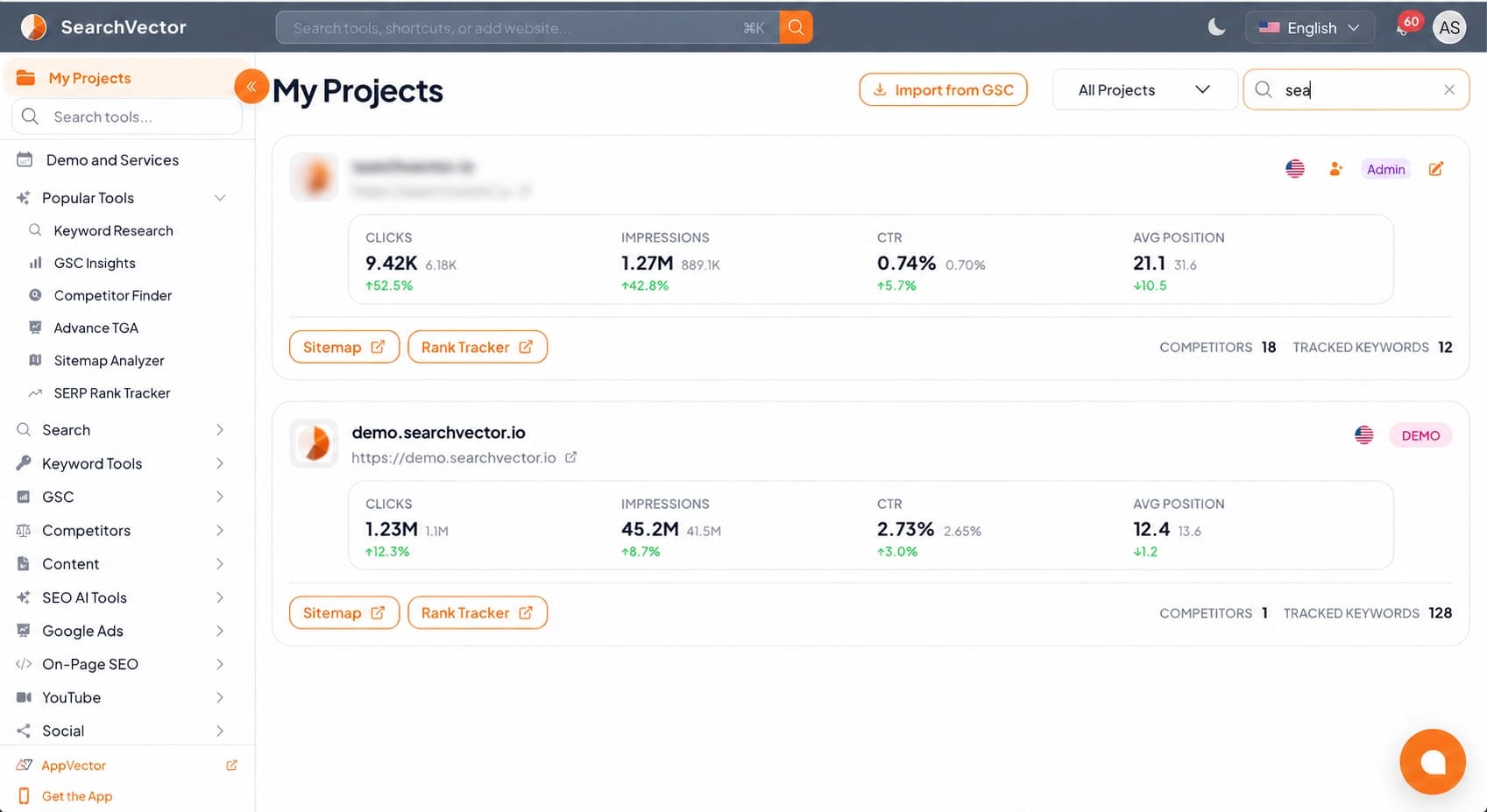
Keep each website in its own project so its research, connected data and planned work have a clear home. Use a consistent project workflow whether your team supports several company websites or manages a portfolio of client sites.
Keep website context with the work
Work within the relevant project when reviewing performance, researching opportunities or organizing content. Keep priorities tied to the website and URLs they affect.
Repeat a useful process across projects
Apply the same research, planning and review routine to additional websites while maintaining a separate content and refresh calendar for each project.
Choose capacity for your workload
Review project, keyword, team and usage allowances when choosing a plan. Discuss custom requirements with our team as the number of websites and people grows.
02
Keyword strategy & rank tracking
Build keyword and content priorities for each website.

Different websites, products and markets need different keyword priorities. Research the queries relevant to each project, compare topic coverage and follow the search positions that matter to your strategy.
Research and group relevant queries
Explore keyword ideas, look up search volumes in bulk and cluster related terms to support page planning and content briefs.
Compare topics and ranking pages
Use topic gap analysis to investigate competing domains, matching URLs and subjects your website could cover more effectively.
Review current rankings and longer-term movement
Run live SERP checks when you need a fresh observation. Use scheduled tracking for selected keywords; available schedules and limits depend on your plan.
03
Search & business performance
Investigate performance at the page and query level.

Connect Google Search Console, Google Analytics and Google Ads to review the search queries, landing pages and campaigns behind your performance. Use the relevant reports to investigate a change before deciding what your team should work on.
Compare search performance across periods
Review clicks, impressions, CTR and position. Filter pages and queries to investigate where visibility or engagement has changed.
Connect search analysis with website activity
Use GA4 landing-page and traffic reports to explore how visitors arrive and what they do on your website. Review connected advertising data when paid search is part of the question.
Give stakeholders the source and context
Use connected account data to support your reporting. Keep the property, date range and metrics clear when discussing results with content, marketing and leadership teams.
04
Technical SEO & indexation
Investigate the technical issues behind page performance.

Content is one part of an enterprise SEO program. Use sitemap analysis, index-status checks and connected technical reports to investigate whether important URLs can be discovered, indexed and reviewed effectively.
Understand your website’s URL inventory
Use Sitemap Analyzer to inspect submitted URLs and compare site structure. Review sitemap changes as part of your ongoing website monitoring.
Review indexing status for important URLs
Use the Index Status Checker to investigate submitted and indexed status. Identify pages that need further review instead of treating every traffic decline as a content problem.
Give technical work a clear next step
Review available Core Web Vitals, page issues and link information in connected technical reports. Turn findings into scoped SEO tasks and record the changes your team publishes.
05
Content operations & accountability
Coordinate new content and refreshes across your websites.

A growing SEO program creates work for writers, editors, analysts and developers. Keep planned pages, existing-page improvements and metadata updates organized by project, with publishing dates and named owners.
Separate new-page plans from existing-page updates
Use the content calendar for new pages and the refresh calendar for existing URLs. Capture the topic, planned date and activity so the intended work is clear.
Make ownership visible
Assign calendar work to team members and organize SEO tasks around your projects. Keep responsibilities attached to the work rather than buried in a reporting document.
Preserve the history of published changes
Use the Title Meta Planner for metadata work and the changelog for published title, body, internal-link and technical updates. Retain the context for later performance reviews.
06
Reporting, alerts & API access
Keep reporting and recurring SEO work moving.

Give regular performance reviews a consistent starting point. Configure supported reports and alerts for connected accounts, and use documented APIs when your team needs to build a custom data workflow.
Set up recurring performance summaries
Configure supported Search Console, GA4, Google Ads and dashboard reports around the accounts your team follows. Use recurring summaries to support regular stakeholder reviews.
Monitor changes worth investigating
Set up available sitemap workflows and alerts to follow changes in your website’s URL inventory. Investigate the affected pages and assign follow-up work when needed.
Build around documented API contracts
Review the API documentation for supported endpoints, authentication and request parameters. API availability and usage limits depend on your plan.
Coordinate work across your organization
Shared project context. Clear team responsibilities.
01
SEO & marketing leaders
Review project priorities, connected performance reports and published changes. Keep discussions about progress grounded in the websites and work your team manages.Project context for performance reviews
02
Content teams & agencies
Organize new pages and existing-page refreshes across projects. Keep topics, dates and assigned owners visible as work moves toward publication.Clear ownership from planning to publication
03
Analysts & developers
Investigate queries, landing pages, indexing and technical issues. Use supported APIs for custom workflows and document the technical changes you ship.Evidence for investigation and implementation
Evaluate the plan against your SEO workload. Review project capacity, keyword tracking, team access, API availability and usage limits.
Enterprise SEO platform questions
Website portfolios, team workflows, technical investigations and reporting.