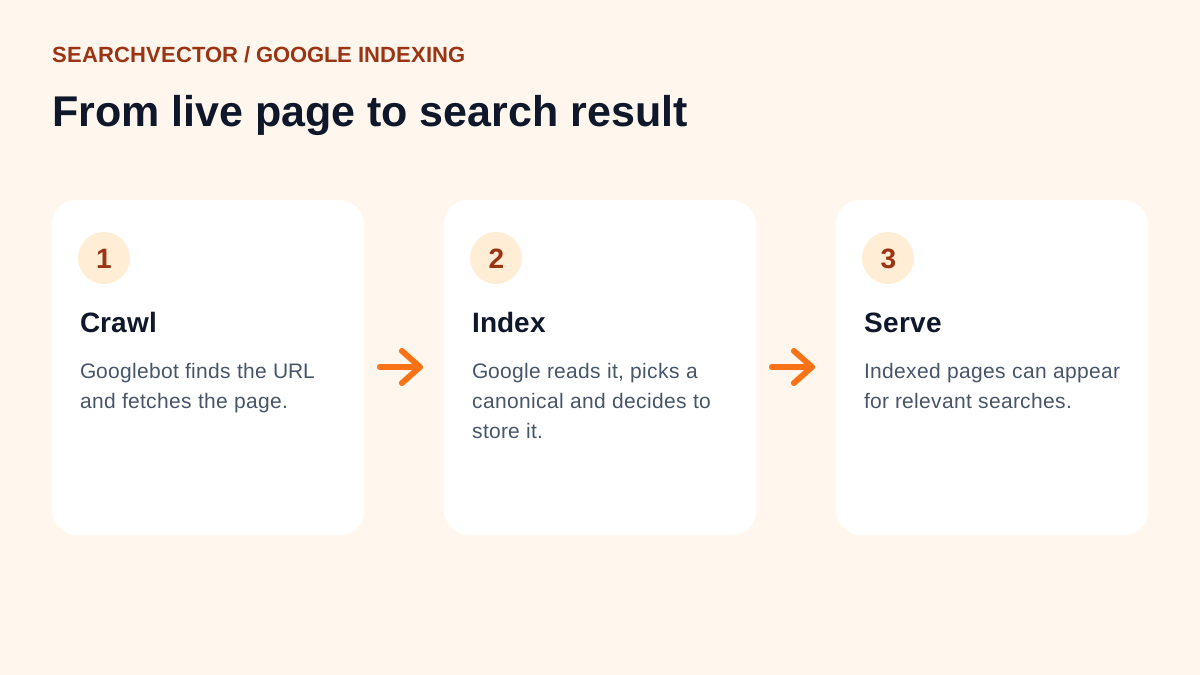
A Google crawler is software that requests web pages and other resources so Google can discover and understand content. Googlebot is the main crawler associated with Google Search. A visit from Googlebot means Google fetched something; it does not mean the page was indexed or will rank for a particular query.
The useful sequence is discover → crawl → process → index → serve. For a site owner, each step calls for different evidence. Start with the exact URL, check whether it can be fetched, and use your own Search Console property to investigate what Google reports about it.
What Googlebot does when it visits
A crawler sends an HTTP request, much like a browser requesting a page. The server returns a status code, headers and, when available, content. Google can also fetch resources needed to render the page, such as JavaScript and stylesheets. A server log records requests; it does not reveal every later decision Google makes about the content.
Google describes Googlebot Smartphone and Googlebot Desktop. Their user-agent headers identify the crawler subtype, but both use the same Googlebot token in robots.txt. Do not assume a page works for Google's mobile crawler just because it looks complete in your desktop browser. Inspect the mobile content and access conditions too.
Follow the page from discovery to a search result
Google groups Search into crawling, indexing and serving. Separating discovery and processing within that explanation helps you troubleshoot. The stages below are a teaching model, not a promise that every discovered URL progresses through them. Google's guide to how Search works explains why crawling, indexing and appearance in results are not guaranteed.
| Stage | What it means for your page |
|---|---|
| Discover | Google learns that a URL exists, for example through a link or sitemap. |
| Crawl | Google requests the URL and receives a response if access succeeds. |
| Process | Google analyzes content and may render the page to understand it. |
| Index | Google considers the content for its searchable index, including duplicate handling. |
| Serve | Google selects results for a particular search. Being indexed does not guarantee visibility for your target query. |
Suppose your browser displays a new guide correctly. That establishes one successful visit under your browser's conditions. It does not establish discovery by Google, access from Google's network, or inclusion in its index. Keep those questions separate when you report a problem to your developer.
Help Google discover the URL you actually want indexed
Give important pages useful internal links from relevant, accessible pages. A guide hidden from navigation and never linked from related content is harder to discover than one connected to an established topic. Use descriptive link text so readers understand the destination as well.
A sitemap provides another discovery path. Google's sitemap documentation explains its usefulness for large sites, new sites and content that is difficult to discover through links. Inclusion in a sitemap still does not guarantee crawling or indexing.
When you publish a guide, check that its preferred URL appears in the right sitemap and that the sitemap can be fetched. SearchVector's Sitemap Analyzer is a starting point for reviewing a sitemap. Treat its output as sitemap evidence, then check the individual page separately. A sitemap entry cannot repair a blocked page.
Choose the right control: robots.txt, noindex or canonical
These controls answer different questions. Mixing them up is a common reason a deliberate publishing change produces an unexpected search result.
- robots.txt controls crawling. A disallow rule tells a compliant crawler not to request matching content. A blocked URL can still appear in search if Google learns about it elsewhere.
- noindex controls indexing. For Google to see a noindex directive in a page or HTTP header, crawling must be allowed. Blocking the URL while adding noindex can prevent Google from reading the instruction.
- A canonical identifies a preferred version. It is a signal for duplicate or similar pages, not an access control and not a guaranteed command.
Google documents the crawl requirement in its noindex guidance and the distinction between signals and selection in its canonicalization guide. Content that must be private needs proper access protection. Robots.txt is publicly readable and is not a security boundary.
Before changing a robots rule, test the precise URL and the intended crawler. SearchVector's Robots.txt Tester can support that review. Record the rule you are investigating rather than interpreting an overall “allowed” result as proof of indexability.
Read the response before rewriting the article
A page can fail at the access stage even when its writing is excellent. Check redirects and the final destination, not only the first response. A successful HTTP status means the request succeeded at that level; it does not certify the page's usefulness or indexing eligibility.
Google's HTTP status guidance distinguishes successful responses, redirects, client errors and server errors. Persistent server failures can affect crawling. An error message returned with a successful status can also create a misleading result, often described as a soft 404 when Google recognizes an error-like page.
For a focused first pass, use SearchVector's Web Page Crawler to review crawlability signals, then compare them with your server and Google evidence. A third-party crawler is not Googlebot. Differences in network, user agent and rendering can explain why two checks disagree.
Worked example: a guide still blocked after launch
This is a fictional diagnostic exercise, not a customer crawl log. Imagine you launch /guides/packing-list, link to it from your guides hub and add it to a sitemap. Your ordinary browser receives the intended article, but a robots rule still disallows the /guides/ directory. The page also contains a noindex directive left over from preparation.
- Write down the intended state. This guide should be public and eligible for indexing. Other unfinished guides may still need protection.
- Check the exact path. Confirm that the relevant robots rule matches this URL. Check the page's response headers and HTML for noindex independently.
- Make a scoped correction. Adjust the rule for the intended public content and remove the unwanted noindex directive. Do not broadly expose every unfinished page to fix one guide.
- Retest after deployment. Confirm that the final URL returns the actual guide, the intended crawler can access it, and both headers and HTML reflect the new indexing instruction.
- Follow up with Google evidence. In your Search Console property, inspect the URL and run a live test. If the page is eligible, you can request indexing. Record the changes and check back without promising a deadline.
The diagnosis is two independent obstacles, not “Google needs more keywords.” Removing only the robots block leaves noindex in place. Removing only noindex leaves Google unable to fetch the page. Even after both fixes, a successful test does not guarantee Google will index it.
Verify that a request really came from Google
Anyone can send a request claiming to be Googlebot in its user-agent header. If suspicious traffic is overloading your site, verify its origin before creating crawler-specific firewall rules.
Follow Google's request-verification instructions. For a manual check, take the source IP from a trustworthy log, perform a reverse DNS lookup, verify the resulting hostname against the documented domain for that crawler category, then resolve it forward. The forward result must match the original IP. A name merely containing “google” is insufficient.
For automated verification, match addresses against Google's published ranges for the relevant crawler or fetcher category. Do not treat all Google-hosted traffic as Googlebot. If your site sits behind a proxy, ask your infrastructure owner which log field represents the verified client address before acting on it.
Use Search Console to decide the next action
Google's URL Inspection documentation distinguishes Google's indexed information from a live test. The indexed report reflects the version Google knows about; a live test checks the current page's potential accessibility and indexability. Neither a successful live test nor an indexing request guarantees inclusion.
Use an account with access to your own property. Compare the inspected URL, last crawl information, indexing status and canonical information where available. A fresh server correction can coexist with older indexed information. Note the dates before concluding the correction failed.
Finish with one evidence-based action: improve discovery if the URL is poorly linked, repair access if requests fail, remove an unintended indexing restriction, or investigate content and duplication if Google has crawled the page but excluded it. Keep a short record of the URL, observation, change and follow-up. That turns “Google hasn't found us” into a problem you can actually investigate.